In an increasingly digital world, the necessity of safeguarding our personal information has never been more paramount. How to Recall Passwords Securely and Easily delves into the critical importance of password security while providing practical insights for creating, managing, and recalling passwords with ease. By exploring techniques to enhance password strength and recommendations for reliable management tools, readers will be equipped with the knowledge needed to protect their sensitive data effectively.
Throughout this discourse, we will investigate the various methods for generating strong passwords, the benefits of utilizing password managers, and techniques to aid in memorization without compromising security. With a focus on best practices, this guide aims to empower individuals to take charge of their online security confidently.
Importance of Password Security

In an increasingly digital world, the role of password security cannot be overstated. Passwords serve as the primary line of defense for protecting personal and sensitive information, including financial data, personal identity, and private communications. A secure password is an essential component of maintaining privacy and integrity in online interactions.Weak or compromised passwords can lead to significant risks, including identity theft, financial loss, and unauthorized access to private accounts.
The consequences of inadequate password management can be severe, affecting both individuals and organizations. For instance, a single compromised password can give cybercriminals access to an entire network, leading to data breaches that can expose thousands of records, resulting in reputational damage and substantial financial penalties.
Risks Associated with Poor Password Management
The implications of poor password practices extend beyond individual users; they encompass businesses and institutions as well. Protecting sensitive data is crucial in today’s cyber landscape, and understanding the risks associated with weak passwords is paramount. The following are key risks related to inadequate password management:
- Identity Theft: Weak passwords are often the gateway for identity theft, enabling attackers to impersonate victims and gain access to personal assets.
- Financial Loss: Cybercriminals may exploit weak passwords to steal funds directly from bank accounts or conduct fraudulent transactions using compromised financial information.
- Data Breaches: Organizations face significant risks of data breaches due to poor password practices. For example, the 2017 Equifax breach, which exposed sensitive information of approximately 147 million individuals, was partly attributed to weak security protocols.
- Reputation Damage: Companies suffering from data breaches often experience a loss of customer trust, which can result in long-term damage to their reputation and brand.
- Legal Consequences: Organizations may face legal repercussions and regulatory fines for failing to protect customer data adequately, as Artikeld by laws such as the General Data Protection Regulation (GDPR).
According to a report by Verizon’s Data Breach Investigations Report, 81% of data breaches are caused by weak or stolen passwords. This staggering statistic highlights the urgent need for everyone to prioritize password security. By employing strong, unique passwords and adopting best practices for password management, individuals and organizations can greatly reduce their vulnerability to cyber threats.
“The weakest link in the security chain is often the human element, specifically poor password management.”
Methods for Secure Password Creation

Creating a strong password is an essential step in safeguarding personal and sensitive information from unauthorized access. A well-crafted password not only helps protect against cyber threats but also provides peace of mind in an increasingly digital world. This section will delve into the characteristics of a strong password, techniques for generating memorable yet complex passwords, and tools that can assist users in the password creation process.
Characteristics of a Strong Password
A strong password exhibits several key characteristics that enhance its security. It should be unique, combining a mix of uppercase and lowercase letters, numbers, and special characters. The length of a password is also crucial; passwords should ideally be at least 12 characters long to increase complexity. Additionally, a strong password must not be easily guessable; thus, it should avoid common words, phrases, or easily obtainable personal information such as birthdays or names.
A strong password combines complexity and unpredictability, making it difficult for potential intruders to crack.
Techniques for Generating Memorable Yet Complex Passwords
Creating a password that is both complex and memorable can be achieved through various techniques. One effective method is to use a passphrase, which consists of a sequence of random words or a sentence that is easy to remember but difficult for others to guess. For example, “BlueSky!Runs@Fast7” incorporates different elements while being memorable for the user.Another technique involves using acronyms based on a personal phrase or a favorite quote.
For instance, transforming “To be or not to be, that is the question” into “Tbontb!t1Tq” utilizes the first letter of each word along with some numbers and symbols. This approach allows users to create a password that is both meaningful and secure.
Password Creation Tools
Several tools can assist users in creating strong and secure passwords. These tools often provide random password generation features and can also store passwords securely. Utilizing such resources can significantly enhance password security practices.Here are some noteworthy password creation tools:
- LastPass: A password manager that generates and stores complex passwords securely.
- Dashlane: Offers password generation and a secure vault for storing credentials.
- 1Password: Provides a simple interface for generating and managing strong passwords.
- Bitwarden: An open-source password manager that includes a password generator and secure storage options.
- NordPass: Focuses on password security with robust generation tools and storage features.
These tools not only help in generating strong passwords but also in maintaining them without the fear of forgetting.
Password Management Tools
In today’s digital environment, managing passwords effectively is crucial for maintaining online security. Password management tools simplify this process, allowing users to store and organize their passwords securely. These tools help prevent password fatigue and reduce the risk of breaches caused by weak or reused passwords.Password managers offer a variety of features designed to enhance security and ease of use.
They typically provide encrypted storage for passwords, automatic password generation, and synchronization across multiple devices. Some also include features such as security alerts, password strength assessments, and secure sharing capabilities.
Comparison of Popular Password Managers
There are several well-known password management tools, each offering distinct features and benefits. The following list highlights some of the most popular options available today and a comparison of their key functionalities:
- LastPass: Offers a free version with essential features and a premium version with advanced options, such as dark web monitoring and one-to-many sharing.
- 1Password: Known for its user-friendly interface, it provides a travel mode for securing sensitive data while traveling, in addition to robust security features.
- Dashlane: Features a built-in VPN for secure browsing and a comprehensive password health check to identify weak or reused passwords.
- Bitwarden: An open-source password manager that provides strong security and is available for free, with premium features at a low cost.
The advantages of using a password manager include enhanced security through encryption, convenience in managing multiple accounts, and the ability to generate strong passwords easily. However, one potential drawback is the reliance on a single application; if the password manager is compromised, all stored passwords may be at risk. Furthermore, manual password management entails creating, storing, and retrieving passwords without the assistance of a tool, which can lead to unsafe practices, such as writing passwords down or using overly simple passwords.
This method may save money but significantly increases the risk of security breaches.
Summary of Top Password Management Tools
The following table summarizes essential functionalities of leading password management tools, providing a quick reference for users considering their options:
| Tool | Key Features | Platform Compatibility | Price |
|---|---|---|---|
| LastPass | Encrypted storage, password generation, sharing options | Web, iOS, Android | Free/Premium $3/month |
| 1Password | User-friendly interface, travel mode, watchtower alerts | Web, iOS, Android, Windows, macOS | Free trial/Subscription $2.99/month |
| Dashlane | VPN service, password health reports, dark web monitoring | Web, iOS, Android, Windows, macOS | Free/Premium $4.99/month |
| Bitwarden | Open-source, cross-platform, secure password sharing | Web, iOS, Android, Windows, macOS, Linux | Free/Premium $10/year |
Utilizing password management tools significantly enhances the security of online accounts and simplifies password management. By choosing the right tool, users can improve their digital lives while maintaining strong security practices.
Techniques for Password Recall
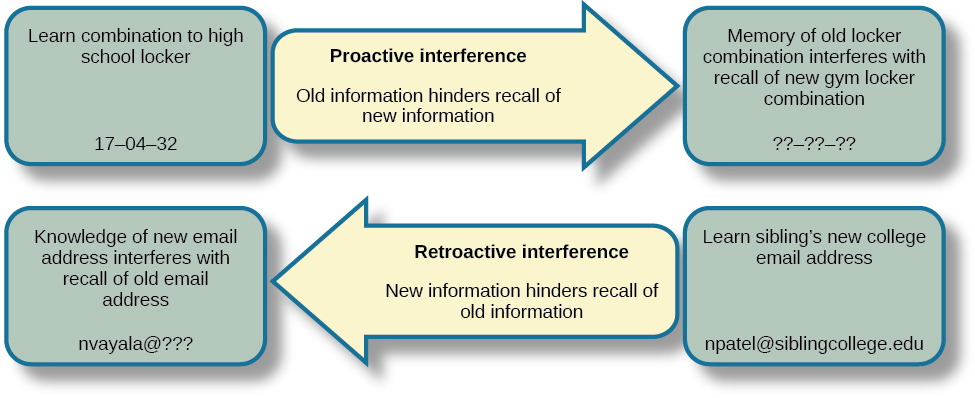
In the digital age, remembering multiple complex passwords can be a daunting task. However, employing effective techniques can significantly ease the burden of password recall while maintaining security. This segment explores various strategies that enhance memory retention for passwords, enabling users to navigate their digital lives more efficiently.
Mnemonic Devices and Their Utility
Mnemonic devices are memory aids that help individuals recall information through associations. They work by linking new information with familiar concepts or creating vivid mental images. When applied to password recall, these techniques can transform a seemingly random string of characters into something memorable.One effective method involves creating acronyms from phrases related to the password. For example, the password “M!ndfulC@ts2023” can be remembered using the phrase “Mindful Cats in 2023,” allowing the user to recall the password by simply thinking of the associated imagery.Another popular technique is the use of rhymes or songs.
For instance, if a password is “G00dM0rning!Sunshine,” one might create a simple jingle to make it easier to remember. This connection between sound and memory enhances retention significantly.
Patterns and Phrases for Easier Recall
Utilizing patterns and phrases is an effective strategy for memorizing passwords. Creating a password based on a memorable phrase can simplify the recall process while ensuring complexity. For instance, transforming the phrase “I love to travel in summer!” into “ILuv2Tr@vel!n$umr” keeps the essence of the original sentence while enhancing its security.Additionally, visual patterns on a keyboard can aid in remembering passwords.
For example, a password like “QWERTY123!” follows the sequential order of keys, making it easier to visualize and recall. Users can create their own patterns that are unique but easy to remember.
Strategies for Memorizing Multiple Passwords
Memorizing multiple passwords can be challenging, but there are effective strategies to do so without compromising security. One recommended approach is to establish a personal system that incorporates variations of a single root password combined with unique identifiers for different sites or services. For instance, if the root password is “SecurePass2023,” variations could include “SecurePassFB2023” for Facebook and “SecurePassGmail2023” for Gmail.Another strategy is to develop a storytelling technique where each password is associated with a specific narrative.
For instance, you might visualize a scenario involving a cat and a dog for the password “C@t&D0gB@lk!” This story creates a vivid mental image, aiding in recall.These techniques not only make password recall simpler but also help in maintaining a high level of security, ensuring that users can access their accounts confidently and safely.
Secure Methods for Storing Passwords
Storing passwords securely is essential in safeguarding personal and professional information. With various storage methods available, it’s crucial to evaluate their pros and cons to determine the most effective approach to password security.One of the primary methods for storing passwords includes traditional paper notes, while digital storage options such as password managers provide alternative solutions. Each method has its distinct advantages and disadvantages.
Pros and Cons of Various Password Storage Methods
Understanding the benefits and drawbacks of different password storage methods helps in selecting the best approach for individual needs. Below is a comparison of some common methods:
- Writing Passwords Down:
Pro: Physical copies can be easily accessible and do not require technology.
Con: Paper records can be lost, stolen, or damaged, posing a significant security risk.
- Password Managers:
Pro: These tools encrypt passwords and offer secure access across devices, minimizing the risk of unauthorized access.
Con: If the master password is compromised, all stored passwords are at risk.
- Browser Storage:
Pro: Most browsers offer built-in password storage that can auto-fill credentials, making it convenient.
Con: Browsers can be vulnerable to attacks, and stored passwords may be exposed if the device is compromised.
- Encrypted Files:
Pro: Passwords can be stored securely within encrypted documents, providing a layer of protection.
Con: Accessibility can be hindered if the encryption method is complicated or if files become corrupted.
Guidelines for Secure Offline Storage Options
For those who prefer offline methods, there are several guidelines to ensure that passwords are stored securely. These practices can help mitigate risks associated with physical storage.
- Use a safe or lockbox to store written passwords, ensuring that access is limited to trusted individuals.
- Avoid labeling the storage container with terms like “passwords” to prevent easy identification by unauthorized persons.
- Consider using a code or mnemonic system for passwords to make them less recognizable even if discovered.
- Regularly update and review the contents to ensure that outdated or unused passwords are safely destroyed.
Best Practices for Secure Digital Storage
When opting for digital storage solutions, adhering to best practices can significantly enhance password security. Implementing these strategies can provide peace of mind and protect sensitive information.
- Choose reputable password managers that utilize strong encryption standards, such as AES-256, to safeguard stored passwords.
- Enable two-factor authentication (2FA) for an additional layer of security, ensuring that even if passwords are compromised, unauthorized access is limited.
- Regularly update passwords and avoid reusing them across multiple accounts to reduce vulnerability.
- Backup password databases securely and ensure that backups are also protected with strong encryption.
Recovering Lost Passwords
Forgetting a password can be a frustrating experience. However, modern security measures provide users with several avenues to recover access to their accounts. Understanding these methods is essential for maintaining access to digital resources while ensuring security.When a password is forgotten, users can follow a systematic approach to regain access. Typically, most online services include a “Forgot Password” link on their login pages.
This leads users through a series of steps which may vary by service but generally involve verification of identity. The following recovery options are commonly available:
Methods for Password Recovery
Various methods are implemented by online platforms to assist users in recovering lost passwords. Each method relies on pre-established security measures that the user set up during account creation. The following points detail the primary recovery methods:
- Security Questions: Many platforms allow users to set up security questions that can be answered to verify identity. It is crucial to select questions and answers that are memorable but not easily guessable by others.
- Email Recovery: This method typically involves sending a password reset link to the registered email address. Users must ensure that their email account is secure and accessible.
- Two-Factor Authentication: If enabled, this method requires users to enter a code sent to their mobile device or generated by an authentication app. This adds an additional layer of security and can facilitate password recovery when needing to verify identity.
“Keeping recovery options up to date is vital for ensuring seamless access to accounts and enhancing security. Update your email and phone number regularly.”
Continuous Password Management
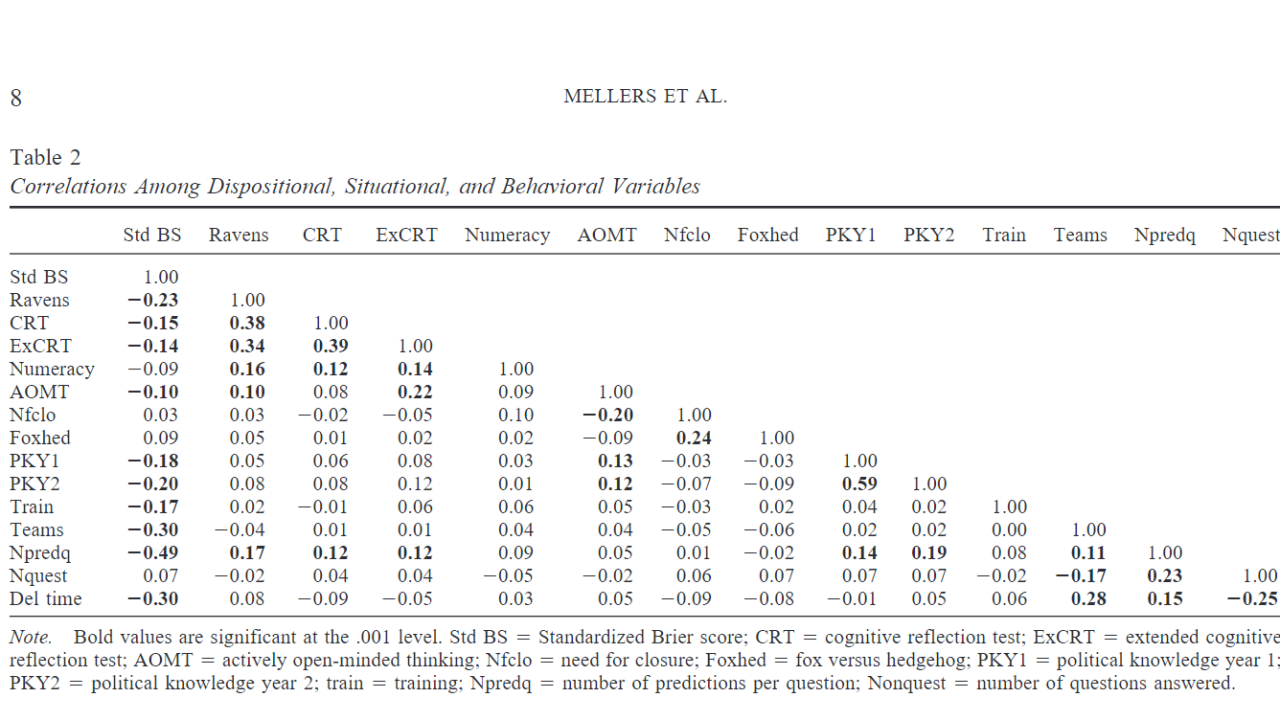
Maintaining the security of passwords is an ongoing process that requires diligence and regular attention. Passwords are often a primary defense against unauthorized access to personal and sensitive information. Therefore, implementing a strategy for continuous password management is crucial for safeguarding digital assets over time.Regular updates to passwords are essential in minimizing the risk of breaches, especially after potential security incidents or data leaks.
It is advisable to change passwords every three to six months, depending on the sensitivity of the information being protected. Additionally, passwords should be updated immediately if there is any suspicion of unauthorized access.
Schedule for Maintaining Password Security
Establishing a structured approach to password management helps in ensuring that security measures are consistently followed. The following checklist Artikels a suggested schedule for maintaining password security:
- Monthly Review: Check all accounts for unauthorized access and confirm password strength.
- Quarterly Update: Change passwords for sensitive accounts, such as banking and email.
- Biannual Audit: Review all stored passwords and identify any that may need updating or are reused across sites.
- Post-Incident Action: Update passwords immediately following any suspected breach or compromise.
Monitoring accounts for unauthorized access is also a vital aspect of continuous password management. This can be accomplished through the following strategies:
Monitoring Accounts for Unauthorized Access
Proactive account monitoring enables users to quickly identify and respond to potential security threats. Consider implementing these methods:
- Enable Alerts: Set up notifications for unusual login attempts or changes to account settings.
- Review Login History: Regularly check the account activity logs for any unfamiliar locations or devices.
- Utilize Security Tools: Employ tools that provide additional layers of security, such as two-factor authentication (2FA) and identity theft protection services.
In the event that unauthorized access is detected, immediate action should be taken. This includes changing the affected password, informing the service provider, and, if necessary, freezing the account to prevent further access. By adhering to this continuous password management strategy, individuals and organizations can significantly enhance their security posture, reducing the likelihood of successful cyberattacks.
Closure
In conclusion, maintaining password security is an ongoing endeavor that requires diligence and the application of effective strategies. By staying informed about best practices for password creation, management, and recovery, individuals can significantly reduce their vulnerability to online threats. Embracing the discussed techniques and tools will foster a more secure digital experience, ultimately leading to peace of mind in an era where online safety is of utmost importance.